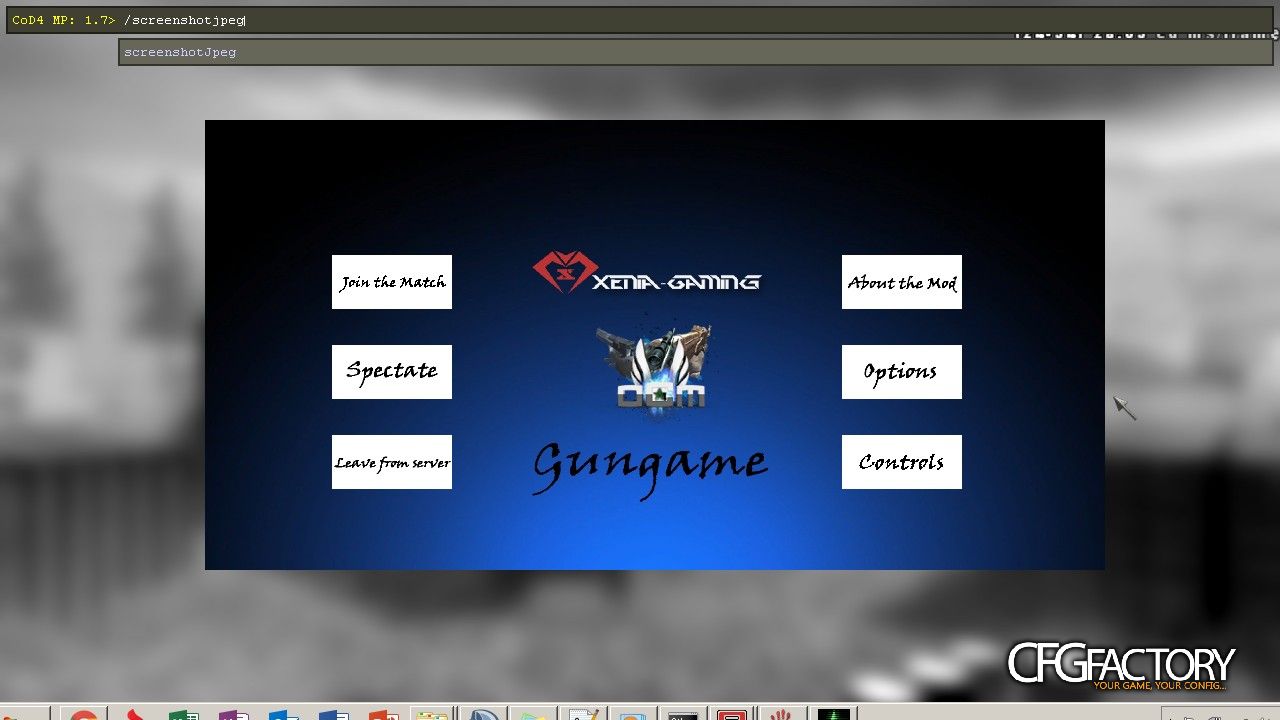
Description
Here's a .menu file for custom looking menu background + instead of choise buttons there are custom made buttons which have same purpose
PS. Picture is only for to show how it should look in-game. I wont add here the material files and image files, those you need to make yourself in asset manager. What I can do is to add an image how the asset manager basic settings for background (+ buttons settings WITHOUT TRANSPARENT BACKGROUND)
PS. Picture is only for to show how it should look in-game. I wont add here the material files and image files, those you need to make yourself in asset manager. What I can do is to add an image how the asset manager basic settings for background (+ buttons settings WITHOUT TRANSPARENT BACKGROUND)
Comments 15
O oCmDruglord
The image about asset manager settings is in .rar
T T-Max
T-MaxAnd what is button layout behaviour? I mean if index was > 20 -> button had moved to other column and what's here?
OoCmDruglord
oCmDruglordTo be honest, I kinda dont understand what you mean under that. Those button sizes itself are 512x256, and the rect part resizes them to in this case 80x36. You can obviously mess around with those numbers in rect. With button size there are some stuffs. The size can be either equal (64x64, 128x128, 256x256 etc.) but also can be like dividable by 2, 4, 8 (512x128, 512x256, 512x64 etc.). If that isnt what you meant by your message. Then write in private, because I honesly didnt understand what you meant by your message :(
B bad moooon
can i change gungame and exna gaming ?
OoCmDruglord
oCmDruglordThere is nothing to change, that is the image file itself and since in file there is no img included u dont even need to change that, bcuz u dont have that part in it. You only have script, all images arent inside. Those you need to make yourself in asset manager
E ekmilan900
how to make a mod.ff file?
OoCmDruglord
oCmDruglordI use customized .bat file to compile ( I wont share it to anyone, sorry ) But there is application in your bin folder called ModBuilder, under 2nd from left (Mod Builder) choose the Build Fast File
( to make .ff) and Build iwd to build the cod4 winrar files for images, sounds, weaponfiles (in some cases you can add there your scripts if you wish them to be public, not nessessary tho)
( to make .ff) and Build iwd to build the cod4 winrar files for images, sounds, weaponfiles (in some cases you can add there your scripts if you wish them to be public, not nessessary tho)
F faizanashraf711
Name for iwi in assest manger?
Ffaizanashraf711
faizanashraf711i mean when we Convert in from assest manger then which name i give of iwi?
OoCmDruglord
oCmDruglordReading this question means you've never used asset manager :D
iwi name is material source asset name after the convertion process. This may be anything. Material name can be anything too, but those must be added to both background slot in .menu and in mod.csv
iwi name is material source asset name after the convertion process. This may be anything. Material name can be anything too, but those must be added to both background slot in .menu and in mod.csv
Ffaizanashraf711
faizanashraf711Yes :(
Ffaizanashraf711
faizanashraf711Can you give me a link for assest manger tutorials?
OoCmDruglord
oCmDruglordSettings of asset manager 2d texture https://gyazo.com/d6a5bb2dde81de031333b75a9ad5bca9 ( You can use BlendFunc Blend if you wish transparent background)
Y YoungD
Thanks! :)
Mmalik92
malik92BRO PLESAE MJHE AP APNE FACEBOOK DE DO
Comments are archived - posting is closed.